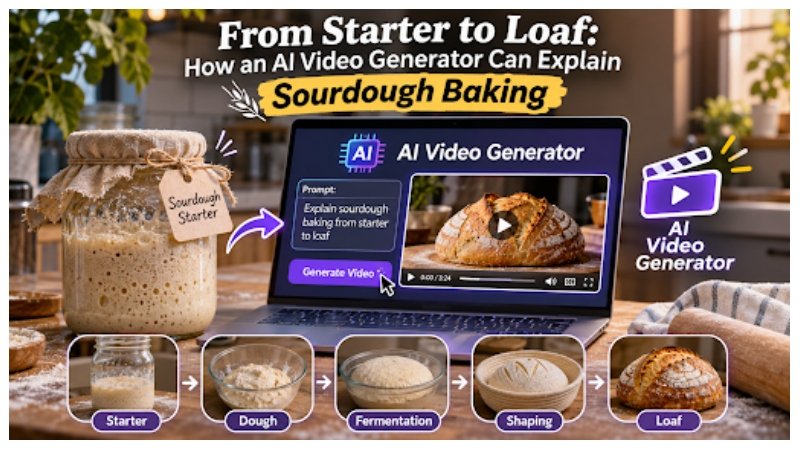
Sourdough baking often looks simple when someone experiences it. A baker mixes flour and water, waits for the dough to develop, shapes it, and places it in the oven. For beginners, however, the process can feel unpredictable. The dough may rise slowly, become too sticky, or behave differently from one baking session to another. Written recipes provide measurements and instructions, but they cannot always show what the baker should look for at each stage.
An ai video generator can help make this traditional baking method easier to understand. By turning individual steps into visual demonstrations, creators can explain how sourdough changes over time and why certain techniques matter. This can be useful for cooking educators, baking businesses, food bloggers, and community workshops that want to teach the process in an approachable way.
Starter Is More Than a Mixture of Flour and Water
A sourdough starter is the foundation of the baking process. It contains naturally occurring yeasts and bacteria that develop through regular feeding. Beginners may understand the ingredients but still struggle to recognize when a starter is ready to use. A visual guide can explain the feeding routine, show how the mixture changes in appearance, and introduce signs of activity such as bubbles and expansion. It can also clarify why a starter may need different amounts of time to become active depending on its environment and condition.
Rather than presenting one fixed timetable as a rule for everyone, the video should emphasize observable signs. This helps new bakers understand that a healthy starter is judged by its activity and behavior, not simply by the number of hours since feeding.
Make Fermentation Easier to Recognize
Fermentation is one of the most confusing parts of sourdough baking because much of the activity happens gradually. Dough develops strength, traps gas, and changes in texture while resting. A sequence of visual stages can help viewers understand what is happening inside the bowl. It might show the dough immediately after mixing, following a period of resting, and later when it has expanded and developed a different texture.
The explanation should also introduce factors that influence fermentation, including room temperature, starter activity, flour characteristics, and hydration. These variables explain why two batches made from the same recipe may not progress at exactly the same speed. Creative teams can explore scene styles and visual consistency during planning with Dreamina, while keeping the actual baking instructions grounded in tested recipes and reliable demonstrations.
Show What the Baker’s Hands Are Doing
Some baking techniques are difficult to learn from written descriptions. Terms such as stretching, folding, shaping, and tightening the dough may sound straightforward, but beginners often need to see the movements before they understand them. A close visual demonstration can focus on hand placement and the direction of each movement. For example, a stretching-and-folding sequence can show how the dough is lifted carefully and brought back over itself. A shaping demonstration can highlight how surface tension develops without tearing the dough. The purpose is not to make every movement look perfect. It is to help viewers understand the technique and recognize common mistakes, such as using excessive force or adding too much flour while shaping.
Explain Why the Dough Sometimes Refuses to Cooperate
Not every sourdough batch behaves as expected. Dough may become overly sticky, spread too much, or appear less active than anticipated. A useful educational video can address these situations instead of showing only ideal results. A creator might present a problem, explain possible contributing factors, and suggest reasonable adjustments. Sticky dough, for instance, may be related to high hydration, insufficient gluten development, or handling technique. Slow fermentation could involve a cool room or a less active starter.
These explanations should avoid promising one solution for every situation. Baking conditions differ, and several factors can produce similar results. When the cause is uncertain, the video can encourage viewers to review their process rather than make unnecessary changes to every ingredient.
Connect Baking Decisions With the Finished Loaf
The final loaf provides an opportunity to connect earlier decisions with visible results. The crust, crumb structure, shape, and overall texture can offer clues about how the dough was handled and baked. A visual comparison can show how different outcomes look without suggesting that one appearance is always evidence of failure. For example, an open crumb may be desirable for some styles of bread, while a more even structure may suit sandwiches better.
Creators can also explain the role of scoring, steam, oven temperature, and cooling time. These details help viewers see that baking does not end when the loaf goes into the oven. Proper cooling is important before slicing because the crumb continues to settle as the bread cools.
Turn One Tutorial Into a Useful Learning Series
Trying to explain the entire sourdough process in one video can overwhelm beginners. A more practical approach is to divide the subject into a series of focused lessons. One video might cover starter care, another could demonstrate dough handling, and a third could explain fermentation and baking. Viewers can watch the relevant lesson when they need it and return to earlier explanations as their experience grows.
Baking educators can also use audience questions to decide what to cover next. Repeated confusion about shaping, for example, may indicate that the original demonstration needs a closer view or a slower explanation. This makes the content more responsive to actual learning needs.
Preserve Accuracy While Making the Process Engaging
Visual content can simplify a complicated method, but it should not make sourdough appear more predictable than it really is. Generated scenes may not accurately represent dough texture, fermentation changes, or the appearance of a finished loaf.
Creators should review every important visual detail against the recipe and practical baking experience. Measurements, temperatures, timing guidance, and food-handling advice should be checked before publication. It is also helpful to distinguish illustrative scenes from footage of a real baking result. A clear and honest presentation builds more useful expectations. Beginners can then learn to observe their own dough rather than relying only on a video timeline.
Final Thoughts
An AI video generator can make sourdough education easier to follow by showing the stages, techniques, and decisions behind successful baking. From understanding starter activity to recognizing fermentation and shaping dough, visual demonstrations can give beginners a clearer sense of what to expect. The most effective videos combine engaging explanations with practical accuracy, acknowledging that temperature, ingredients, and technique can influence results. When created with care, these resources can help more people approach sourdough baking with patience and confidence. Click here for more Information.
Frequently Asked Questions
Why is sourdough difficult for beginners to learn?
The process depends on fermentation and dough development, which can change with temperature, ingredients, and starter activity. Beginners often need visual examples to recognize these changes.
Can generated videos accurately demonstrate dough-handling techniques?
They can help illustrate movements, but important techniques should be reviewed against real baking demonstrations to ensure that hand positions, dough behavior, and instructions are correct.
Should a sourdough tutorial give exact fermentation times?
It can provide approximate guidance, but it should also explain visual signs of readiness because fermentation speed varies with environmental conditions and starter strength.
How can baking educators organize video lessons for beginners?
They can separate the process into focused topics, such as starter maintenance, mixing, folding, shaping, fermentation, scoring, and baking.
What makes a sourdough educational video genuinely useful?
Clear demonstrations, realistic expectations, accurate instructions, and explanations of common problems help viewers understand the process instead of simply copying a sequence of steps.